
Hyundai Elantra (CN7): Navigation-Based Smart Cruise Control (NSCC) / Function operation
Operating conditions
Navigation-based Smart Cruise Control is ready to operate if all of the following conditions are satisfied:
- Smart Cruise Control is operating
- Driving on main roads of highways (or motorways)
Information
For more details on how to operate Smart Cruise Control, refer to “Smart Cruise Control (SCC)� section in chapter 7.
Function display and control
When Navigation-based Smart Cruise Control operates, it will be displayed on the cluster as follows:
• Function standby
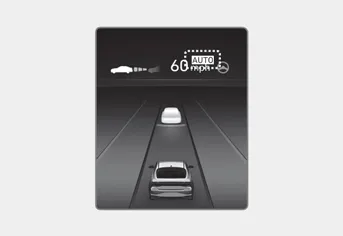
If the operating conditions are satisfied,
the white
 indicator will
illuminate.
indicator will
illuminate.
• Function operating
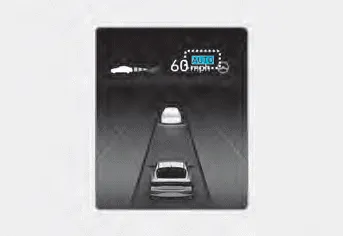
If temporary deceleration is required in
the standby state and Navigation-based
Smart Cruise Control is operating, the
green
 symbol will illuminate on the
cluster.
symbol will illuminate on the
cluster.
If the Highway Set Speed Auto Change
function operates, the green
 symbol and set speed will illuminate on
the cluster, and an audible warning will
sound.
symbol and set speed will illuminate on
the cluster, and an audible warning will
sound.
WARNING
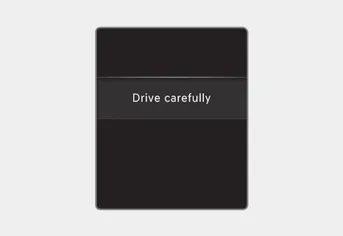
‘Drive carefully’ warning message will appear in the following circumstances:
-- Navigation-based Smart Cruise Control is not able to slow down your vehicle to a safe speed
Information
Highway Curve Zone Auto Slowdown and
Highway Set Speed Auto Change function
uses the same
 symbol.
Highway Curve Zone Auto Slowdown
- Depending on the curve ahead on the highway (or motorway), the vehicle will decelerate, and after passing the curve, the vehicle will accelerate to Smart Cruise Control set speed.
- Vehicle deceleration time may differ depending on the vehicle speed and the degree of the curve on the road. The higher the driving speed, deceleration will start faster.
Highway Set Speed Auto Change
- Highway Set Speed Auto Change function will operate when Smart Cruise Control set speed and the highway (or motorway) speed limit is matched.
- While Highway Set Speed Auto Change function is operating, when the highway (or motorway) speed limit changes, Smart Cruise Control set speed automatically changes to the changed speed limit.
- If Smart Cruise Control set speed is adjusted different from the speed limit, Highway Set Speed Auto Change function will be in the standby state.
- If Highway Set Speed Auto Change function has changed to the standby state by driving on a road other than the highway (or motorway) main road, Highway Set Speed Auto Change function will operate again when you drive on the main road again without setting the set speed.
- If Highway Set Speed Auto Change
function has changed to the standby
state by depressing the brake pedal
or pressing the
 switch on the
steering wheel, press the
switch on the
steering wheel, press the
 switch
to restart the function.
switch
to restart the function. - Highway Set Speed Auto Change function does not operate on highway interchanges or junctions.
Information
- Highway Set Speed Auto Change function only operates based on the speed limits of the highway (or motorway), it does not work with speed cameras.
- When Highway Set Speed Auto Change function is operating, the vehicle automatically accelerates or decelerates when the highway (or motorway) speed limit changes.
- The maximum set speed for Highway Set Speed Auto Change function is 86 mph (140 km/h).
- If the speed limit of a new road is not updated in the navigation, Highway Set Speed Auto Change function may not operate properly.
- If the speed unit is set to a unit other than the speed unit used in your country, Highway Set Speed Auto Change function may not operate properly.
Setting With the engine on, select ‘Driver Assistance → Driving Assist → Highway Auto Speed Change’ from the Settings menu to turn on Navigation-based Smart Cruise Control and deselect to turn off the system.
Navigation-based Smart Cruise Control may not operate normally under the following circumstances: The navigation is not working properly Speed limit and road information in the navigation is not updated The map information and the actual road is different because of real-time GPS data or map information error The navigation searches for a route while driving GPS signals are blocked in areas such as a tunnel The navigation is updated while driving Map information is not transmitted due to infotainment system's abnormal operation A road that divides into two or more roads and joins again The driver goes off course the route set in the navigation The route to the destination is changed or canceled by resetting the navigation The vehicle enters a service station or rest area The speed limit of some sections changes according to the road situations Android Auto or Car Play is operating The navigation cannot detect the current vehicle position (ex: elevated roads including overpass adjacent to general roads or nearby roads exist in a parallel way) The navigation is being updated while driving The navigation is being restarted while driving There is bad weather, such as heavy rain, heavy snow, etc.
Other information:
Hyundai Elantra (CN7) 2021-2026 Service Manual: Blower Resistor (Manual)
Repair procedures Inspection1.Measure the resistance between the terminals.2.The measured resistance is not within specification, the blower resistor must be replaced. (After removing the resistor)Replacement1.Disconnect the negative (-) battery terminal.
Hyundai Elantra (CN7) 2021-2026 Service Manual: Troubleshooting
Trouble Symptom ChartsTrouble Symptom 1Trouble Symptom 2 Trouble symptom Probable cause Remedy The set vehicle speed varies greatly upward or downward"Surging" (repeated alternating acceleration and deceleration) occurs after settingMalfunction of the vehicle speed se
Categories
- Manuals Home
- Hyundai Elantra Owners Manual
- Hyundai Elantra Service Manual
- Body (Interior and Exterior)
- Engine Control / Fuel System
- General Tightening Torque Table. General information
- New on site
- Most important about car
