
Hyundai Elantra (CN7): Button Engine Start System / Start/Stop Button
Components and components location
| Component |
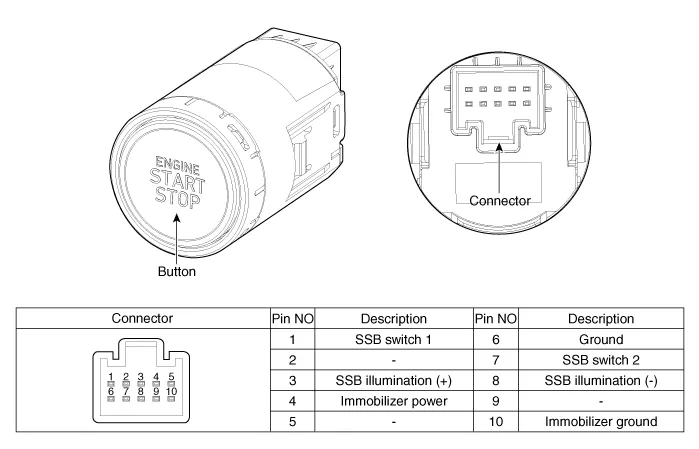
Repair procedures
| Removal |
| 1. | Disconnect the negative(-) battery terminal. |
| 2. | Remove the AVN Head unit. (Refer to Body Electrical System - "AVN(Audio Video Navigation) head unit") |
| 3. | Loosen the mounting screws and remove the start/stop button (A).
|

| Installation |
| 1. | Install the start/stop button. |
| 2. | Install the AVN head unit. |
| 3. | Connect the negative (-) battery terminal. |
Component Location1. Smart key unit (IBU)2. Interior antenna 23. outside door handle4. Interior antenna 15. FOB Key6. Door antenna1. Bumper antenna2. Trunk antenna
Other information:
Hyundai Elantra (CN7) 2021-2026 Service Manual: Specifications
SpecificationAir Conditioner Item Specification CompressorTypeGamma 1.6 MPI, Gasoline 2.0 NU MPI, Gasoline 1.6 T-GDI : 6HVx14Gasoline 1.6 MPI : 6HVe14Oil type & CapacityFD46XG (IDEMITSU) 100 ± 10 g Pulley type6PK-TYPEDisplacement145 cc/revExpansion valveTypeBlock type RefrigerantTypeR - 134
Hyundai Elantra (CN7) 2021-2026 Service Manual: Evaporator Temperature Sensor
Description and operation DescriptionThe evaporator temperature sensor will detect the evaporator core temperature and interrupt compressor relay power in order to prevent evaporator from freezing by excessive cooling. The evaporator temperature sensor has the Negative Temperature Coefficient (NTC).
Categories
- Manuals Home
- Hyundai Elantra Owners Manual
- Hyundai Elantra Service Manual
- Engine Control / Fuel System
- Function settings
- Front Bumper
- New on site
- Most important about car
